 Hunter Watch
Your hunting log starts on your wrist.
When something happens in the field, record it where you are. Hunter Watch brings route recording and hunting markers to Apple Watch, then brings the day together on iPhone.
Start a hunt on Apple Watch
Open Hunter Watch on your watch and start recording. Location permission lets the watch record your route. The recorded distance and elapsed time help you keep track of the day while it is happening.
Mark what happened, where it happened
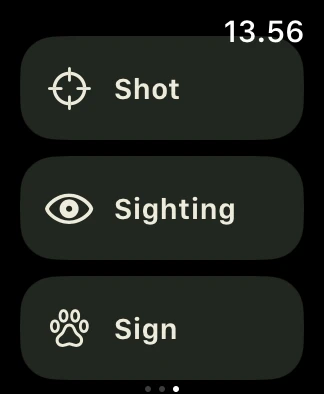
Add a sighting, shot, animal sign or harvest from your wrist. These moments belong to the hunt, so you can return to their positions on the route afterward. You can pause and resume recording during the day.
Bring the record back to iPhone
Finish the hunt on your watch. Hunter Watch transfers the recorded hunt to your paired iPhone, where you can review its route and markers, add photos and keep it in your diary. Transfer timing depends on the connection between your devices.
What you need
Hunter Watch is designed for a paired iPhone and Apple Watch and requires a paid subscription. Install the watch app and allow location access for route recording. Apple Health access is optional; it adds supported activity readings and the option to save the hunt as a hiking workout.
A record of your hunt
The app records your day. It does not provide hunting permits, land-access rights, emergency assistance or a guarantee of GPS accuracy. Check local conditions and permissions yourself.

iPhone + Apple Watch · Paid subscription